

Have you ever participated in a website that allows any approved user to submit content to the site? Maybe you’ve throug about using this type of model with your own website, but you’re not sure how to make this happen.
Allowing other users to submit posts to your WordPress blog isn’t difficult. You can allow them to register with the required information of your choice before they submit any content. This will allow you to moderate any content they submit for approval. Here’s how it works.
How to Allow Registered Users to Submit Blog Posts
A built-in tool is found in WordPress allowing you to assign roles to all the users of your website/blog. This allows any WordPress website to easily become a multi-author website. When a user registers, you can make it so they can submit posts for approval.
- Step #1 – Log into your WordPress Dashboard
- Step #2 – Go to Settings >> General
- Step #3 – Check “Anyone can Register” for the Membership option.
- Step #4 – Choose the “New User Default Role” and make it either Contributor or Author
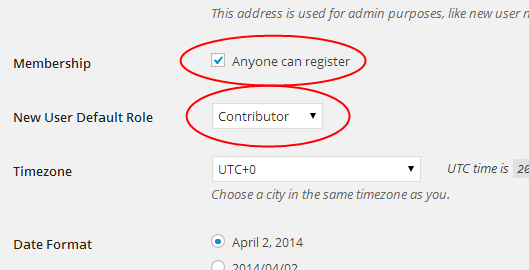
It’s now possible for users to register for your WordPress Website. The next step is letting them know they can register.
This is easily done by going to Appearance >> Widgets and moving the Meta Widget over to the sidebar of your choice. Once you’ve done this, users will be able to log into your website.

When a user sees this, they can log into the WordPress admin area of your site. However, they will only be able to submit posts. The limited access was given when you chose either Author or Contributor in the steps above.
If, at any time, you needed to change the access of a user to a more limited option, you can change it individually to Subscriber. Of course, if you would like to grant more access, you can change the user to Admin to give them full access to your site.
NOTE: You should only grant Admin access to those needing to make changes to specific area of your website. This can be dangerous if you’re unsure whether you can trust the user.
Allowing for Posts to be Submitted Without Forcing User Registration
If you prefer to keep it simple and not make users register to submit posts, you can make this happen, as well. You will need a plugins called, User Submitted Posts, which is free.
Once you’ve installed and activated the plugin, you will be able to access it from, Settings >> User Submitted Posts. This section will allow you to configure the plugin to work properly for your needs.
After accessing the plugin, click on then “Options” section.
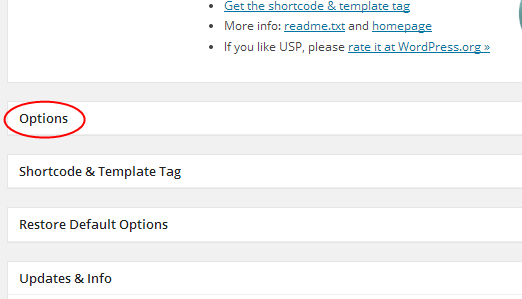
This should give you a screen that looks like this:
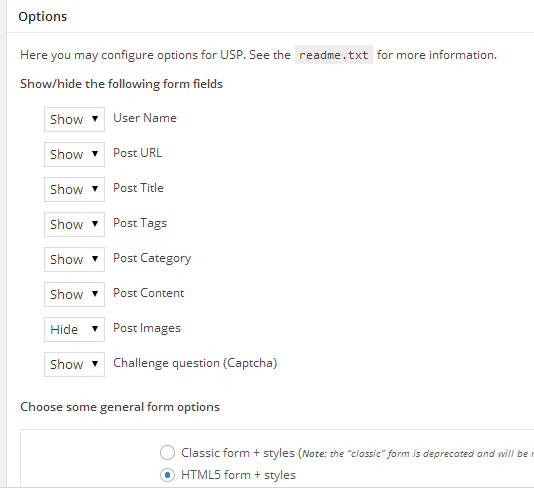
On this page, you want to change the settings to match your needs. You will be able to select the fields you want to show up on the submission form and hide anything you don’t want your users to be able to see.
This plugin will also allow you to choose a default author for each of the posts submitted. We recommend you choose an author profile set up for guest posts. This user can be called Guest or Guest User.
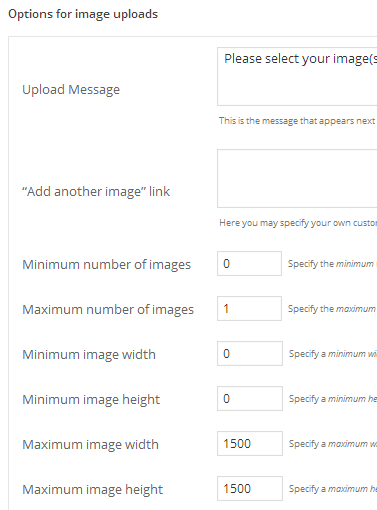
Within the plugin, you can also set the submission form to all your users to upload images. This option is found at the bottom of the “Options” section. You can set the minimum number of images and the maximum number. You can also set the minimum and maximum for the size of images.
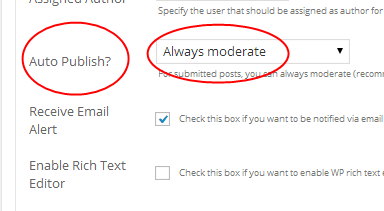
Another very important option of the User Submitted Post WordPress plugin is the “Auto Publish?” option. This option allows you to select, “Always Moderate” or “Always Publish Immediately.” It’s highly recommended that you select the “Always Moderate” option. However, you can also choose to automatically approve some authors with the number in this dropdown. The number represents the number of approved posts each user must first submit before their posts are automatically approved.
Allowing Your Users to Submit Just Links or Images for Your WordPress Blog
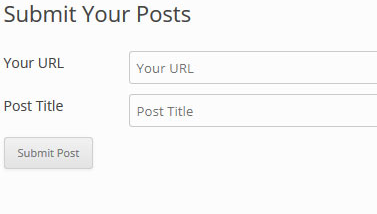
If you prefer just letting your users submit links or images, you can change the settings in the User Submitted Posts to hide all other options. Just make sure the “Post URL and the “Post Title” fields are selected to show these options. All other fields should be set to hide. Your submission form would look like this:
This specific plugin doesn’t install a widget on your WordPress website, but it does come with a shortcode you can use in a text widget. This allows the form to be shown in the sidebar or other widget area of your WordPress blog.
Now you have two very easy ways to allow users of your WordPress blog to submit posts. Use either the plugin, if you prefer to make it very easy on your users or allow them to register first for added security. Either option will allow your website visitors to fill your WordPress blog with content.
