

How to Monetize Your WordPress Blog

Have you started a WordPress blog and you’re having all kinds of fun posting, but you want to make a little cash from it? Did you know there are numerous ways you can monetize your WordPress blog? In this post, we are going to cover multiple ways to monetize your WordPress blog. What are Your Choices? The easiest ways to monetize your WordPress blog include: Google AdSense Amazon Affiliates Commission Junction ClickBank You can use a combination of these four methods of monetization or just choose one. Monetizing Your WordPress Blog with Google AdSense Google AdSense allows you to insert …
Can you Insert Ads into Your WordPress Post?
The simple answer to this question is yes, but there’s an easy way to do this and a not so easy way. The easy way involves using the right WordPress plugin. If you’re looking for an easy way to insert Google AdSense, Amazon Product Banners or any other type of advertising within the content of your WordPress posts, we are here to help. Here’s a quick WordPress tutorial on inserting ads into your WordPress post. Which Plugin is Right for the Job? Using a plugin to insert ads into your WordPress content is far easier than trying to adjust the …
A Quick Guide for Choosing the Best WordPress Plugins for your Blog
Using WordPress plugins is much like using an app on your smartphone. It seems as if any task you want to perform in WordPress has a plugin that makes it easier. When you start searching for these plugins, you need to know how to find the right one for your specific needs. Here are a few tips and tricks to help you find the WordPress plugin that will fit best with your task. Define Your Needs/Wants Before you start searching for plugins, you want to define the needs/wants you’re hoping to get out of the plugin. For example, maybe you …
Using Revisions to Undo Changes Made in WordPress
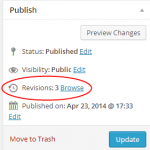
Sometimes, you make changes and you wish you could revert back to an earlier version of a WordPress post. The good news is that you can revert back with revisions. This makes it very easy to undo changes and go back to a version of the post created in the past. The feature we will be working with in this WordPress Tutorial is called “Post Revisions” or “Revisions.” When you create a WordPress Post and you update it you will have created two versions of the post. WordPress saves the revised version, which is the new version and the previous …
Can you Paginate a WordPress Post?
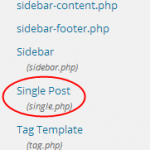
Sometimes, you may have a post for your blog that’s really long or contains many parts. You’ve probably seen other blogs that use a few pages for these types of posts and display a separate image for each section of the post. This is called pagination and its possible do to this with your WordPress Posts. Why Would You Want to Paginate a WordPress Post? There are many reasons to paginate a WordPress post, but the main reason is to reduce bounce rates and increase your pageviews. When a visitor goes to multiple pages on your website, it looks good …
An Easy Way to Display Your Related Posts and Pages in WordPress

Maybe you’ve seen other blogs that show three to five related pages or posts at the end of each page or post on their blog. This is a very powerful way to keep readers on your website, help them find good information and provide many other benefits. In this WordPress tutorial we will cover the easiest way to display related posts and pages below your content in WordPress. Using YARPP or Yet Another Related Posts Plugin to Display Related Posts and Pages Start by downloading the YARPP plugin, here. Then, you will need to upload the plugin by going to …
A Beginner’s Guide to the Settings Tab in WordPress

One of the many tabs found in your WordPress dashboard is called the “Settings” tab. This section contains many sub-sections and will often contain even more, as you install plugins. The main sub-sections found here include: General Writing Reading Discussion Media Permalinks You will use most of these sections at least once for your new WordPress website. In this WordPress tutorial, we are going to take a quick look at each of these sub-sections of the Settings tab. The “General” Settings Area of WordPress When you go to Settings >> General, you can make a few adjustments to the basic …
A Beginner’s Guide to the Tools Section in WordPress

The Tools section found in WordPress allows you to access a few specific features. There’s not much to this section, unless you’ve added plugins that come with tools. However, this section of WordPress does have three sub-sections called: Available Tools Import Export In this short WordPress Tutorial, we will take a quick look at each of these sub-sections. The “Available Tools” Section in WordPress You can access this section by going to Tools >> Available Tools within your WordPress dashboard. Here, you will find a list of all your tools. If you’re new to WordPress and it’s a new installation, …
A Beginner’s Guide to the Users Tab in WordPress
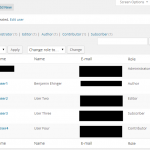
The Users tab found in your WordPress dashboard will allow you to add, delete and make changes to all the users you want to be able to access your website. This section contains three sub-sections called: All Users Add New Your Profile You will use these sub-sections whenever updating user information or adding a user. In this WordPress Tutorial, we are going to take a quick look at all three sub-sections of the Users tab. The “All Users” Section in WordPress When you go to Users >> All Users you will get a list of all the users for your …

Can you Paginate Comments in WordPress?
Have you ever seen a blog that actually has multiple pages of comments? You may not get that many comments, as a beginner, but you may still want to paginate your comments in WordPress. In this short WordPress tutorial, we will show you the easiest way to paginate your comments. Paginating Your WordPress Blog Comments The process to paginate your comments in WordPress is very easy. Start by logging into your WordPress dashboard and going to Settings >> Discussion. This is where you will find the option to break your comments into pages. It’s found under the “Other Comment Settings” …