

WordPress Beginner’s Most Frequently Asked Questions – Part One

WordPress beginners often have many questions and they want answers. Once you’ve installed WordPress, what do you do now and what do you do when you run into a road block? Here are some of the most comment questions asked by those new to WordPress and the answers to these questions. Why Can’t I See the Plugins Menu in My Dashboard? Often, beginners to WordPress don’t understand why they cannot see the plugins menu within their WordPress dashboard. If you face this issue, you’re using the free WordPress.com platform instead of the self-hosted WordPress.org. The free WordPress.com doesn’t provide the …
Adding a PayPal Donate Button to your WordPress Blog
One of the ways you can help supplement the upkeep of your blog is through “PayPal donations” and that requires a donate button. Understanding how to add this button to your WordPress website can help in many ways. Whether you’re running a non-profit blog or you just want to allow your followers to support your project, you can use the PayPal donation button. How to Create Your PayPal Donate Button You will need to have a PayPal Account to create a PayPal Donate button. If you don’t’ have one, go to http://www.PayPal.com and create your account. You will also need …
Why is Linux Shared Hosting the Better Choice?

The hosting world is full of choice and it’s one of the most competitive industries online. When it comes time to start your own website, blog or any other online project, Linux hosting is the right choice. What is Linux Hosting? Simply put, Linux hosting is any type of hosting using the operating system called Linux on the server. Linux is a Unix-like operating system provided as a free, open source choice. It was first developed in 1991 as a free operating system for Intel x86-based computers. Since, it has become one of the most popular open source operating systems …
How to Paste Snippets into WordPress From the Web

If you’re not familiar with PHP, pasting snippets of code into the functions.php file of your theme can be a bit confusing. Sometimes this is a necessary process to customize your WordPress blog for your specific needs. Without the right knowledge of PHP, you may break your website. If that’s why you are reading this blog post, you’re not alone. The functions.php file of your theme can be found in your cPanel at: /wp-content/themes/themename/ It’s not the same as the functions.php file found in the /wp-includes/ folder. Understanding the basics of PHP Pasting snippets of code into WordPress starts with …
A Quick Beginner’s Guide to Installing a Plugin in WordPress

If you’re using the WordPress.org version of WordPress, you can use both free and premium plugins. These plugins will allow you get the most out of your WordPress blog and website. Those not able to find the “Plugins” section in WordPress are using the WordPress.com version, which doesn’t utilize plugins. Using plugins is one of the most powerful ways to customize the look and function of your website. Plugins allow you to create better security, SEO, social media sharing and so much more. No matter what you want to accomplish, WordPress probably has a plugin for it. Here are a …
Can you Customize the WordPress Admin Area?
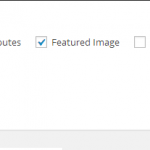
Maybe you think your WordPress dashboard is a bit cluttered or isn’t quite like you want it to be. There are plenty of ways you can customize what shows up in the edit screens, the color of your dashboard and many other parts of your WordPress admin area. Some of these settings will change per user and not across the entire blog, however. Adjusting the Screen Options Once of the easiest ways to customize the WordPress admin area is with the screen options found in the both the page and post edit screens. It’s found at the top right of …
Tips to Help Beginners Fight Comment Spam in WordPress

Comment spam is a huge issue in WordPress and it’s unavoidable, if you create a popular blog. However, there are ways to cut it down to a manageable level and even eliminate it for good. Spam comments are very easy to spot because they are full of pornography, pharmaceuticals and plenty of other spammy things. You will notice the usernames used make very little sense and the comments usually have nothing to do with your actual post. Here are a few tips to help you handle comment spam in WordPress. Making Adjustments to the Discussion Settings The first thing you …
Reliable vs Cheap Reseller Hosting

Should you choose cheap reseller hosting or is it more important to find reliable reseller hosting? This question may seem like common sense, but many beginners don’t really understand where to start. Hosting is available for incredibly cheap prices. However, you often get what you pay for and with anything labeled as “cheap” you can expect some issues. Resellers of hosting, especially beginners, really cannot afford to deal with hosting issues. What is Reseller Hosting? If you’re considering reseller hosting, it’s important to know what it is, first. This type of hosting allows the account owner to actually sell and …
A Quick Guide to Creating Sticky Posts in WordPress
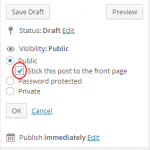
Creating Sticky Posts in WordPress is a very important part of blogging, for some. This type of post can provide a few benefits for your website. Not only will you be able to keep your most important posts showing up first in your feed, but you can also create better SEO with sticky posts. Beginners often don’t understand what stick posts are or how they work. Discovering how to use sticky posts will help you to provide a better blogging experience and many other benefits of your blog and your readers. It’s a very easy process, for sure. Here’s how …

Can you Turn off Comments for your WordPress Blog?
Flipping the switch and turning off comments on your WordPress blog is very easy. This can be helpful if you want to eliminate comments on your entire blog or just on certain pages and posts. Before you shut off the comments on your blog, you may want to consider the fact that once you do this, you won’t be able to create any type of discussion on your WordPress blog. Allowing comments can help with the SEO of your WordPress site and more. However, not all websites needs comments. How to Turn off All Comments in WordPress If you want …