Category Archives - Page 26
Posted on April 18, 2014 By
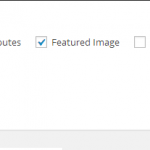
Maybe you think your WordPress dashboard is a bit cluttered or isn’t quite like you want it to be. There are plenty of ways you can customize what shows up in the edit screens, the color of your dashboard and many other parts of your WordPress admin area. Some of these settings will change per user and not across the entire blog, however. Adjusting the Screen Options Once of the easiest ways to customize the WordPress admin area is with the screen options found in the both the page and post edit screens. It’s found at the top right of …
Read More
Posted on April 18, 2014 By

Comment spam is a huge issue in WordPress and it’s unavoidable, if you create a popular blog. However, there are ways to cut it down to a manageable level and even eliminate it for good. Spam comments are very easy to spot because they are full of pornography, pharmaceuticals and plenty of other spammy things. You will notice the usernames used make very little sense and the comments usually have nothing to do with your actual post. Here are a few tips to help you handle comment spam in WordPress. Making Adjustments to the Discussion Settings The first thing you …
Read More
Posted on April 17, 2014 By
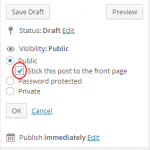
Creating Sticky Posts in WordPress is a very important part of blogging, for some. This type of post can provide a few benefits for your website. Not only will you be able to keep your most important posts showing up first in your feed, but you can also create better SEO with sticky posts. Beginners often don’t understand what stick posts are or how they work. Discovering how to use sticky posts will help you to provide a better blogging experience and many other benefits of your blog and your readers. It’s a very easy process, for sure. Here’s how …
Read More
Posted on April 17, 2014 By
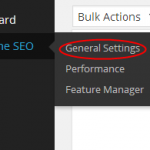
SEO or search engine optimization is a very important part of any blog or website. If you want to make sure you’re found on the search engines, proper SEO is vital. The best part about WordPress is the enormous amount of plugins you can use for various tasks, including SEO. You can increase your on page SEO by using either the WordPress SEO by Yoast plugin or the All-in-One SEO Pack plugin. Both of these plugins will provide you with plenty of help for your on page SEO. Of course, you need to do more than just install a plugin …
Read More
Posted on April 16, 2014 By
Pingbacks and trackbacks often confuse many new WordPress users. Moderating these types of comments can be tricky, if you don’t know what you’re doing. Whenever somebody links back to one of your WordPress blog posts, you will get a pingback or trackback in the comment section. Many WordPress beginners don’t know whether to approve, trash or spam these comments. Understanding what you should do with these comments and what they are, is very important. Here’s a quick look at what to do with Pingbacks and Trackbacks in WordPress. What is a Pingback? Pingbacks happen often and allow different types of …
Read More
Posted on April 16, 2014 By
Writing original content for you blog is vital to your success. There is nothing more annoying than finding out a number of other sites have started to scrape your excellent content and use it for their own needs. Even though Google has gone to great lengths to ensure you still outrank them, it can still cause issues. What is Content Scraping? Content scraping is typically done with a script or software program. It will pull content from a number of different sites and create one website out of that content. Since anybody can create a WordPress blog today, this has …
Read More
Posted on April 15, 2014 By

Creating a custom archives page for your WordPress blog can make it very easy to bring all your old content together on one page. You can have one page specifically dedicated to the archives for your categories, authors, tags, posts and more. Here’s how you make this happen. How to Create a Custom Archives Page It starts with creating our template for your custom archives page. You will need to open a new file in a text editor, such as Notepad. Name this new file page-archive.php. Now you will need to add the following lines to your new file: You …
Read More
Posted on April 15, 2014 By

Most beginners and some veterans have no idea that they can install WordPress on their personal computer. Of course, this is only for testing and learning purposes, but it can be very helpful. The process isn’t very difficult, but you will need WAMP to make this happen. What is WAMP? WampServer or WAMP is a compilation of MySQL, Apache web server and PHP. It’s a bundled used for Windows computers and required to set up your own local server environment. If you want to install WordPress on your personal computer and you’re running Windows, you will need WAMP or XAMPP, …
Read More
Posted on April 14, 2014 By
Social media has been growing faster than just about anything else on the internet, which means you need to be able to leverage it for your WordPress blog. The best way to leverage sites, such as Facebook, Twitter, Tumblr and the any others is with your own customized short URL. Without your own shortened URL, you may end up sharing something automatic whenever you share your blog. However, the right short URL can draw attention, allow for branding and make it easier to share your WordPress blog. Step #1 – Buy a Short URL Since many blogs have a longer …
Read More
Posted on April 14, 2014 By

One of the most powerful tools you can add to your WordPress arsenal is Google Analytics. This is by far the best free tracking tool you will find online today. It’s very easy to install on your WordPress blog, as well. Why Should Bloggers Use Google Analytics? Tracking is one of the most important things for any website or blog. If you don’t know where your traffic is coming from and how people are finding you, it’s hard to target your marketing better. Here are a few of the things you will be able to do with Google Analytics. Understand …
Read More



Tips to Help Beginners Fight Comment Spam in WordPress
Comment spam is a huge issue in WordPress and it’s unavoidable, if you create a popular blog. However, there are ways to cut it down to a manageable level and even eliminate it for good. Spam comments are very easy to spot because they are full of pornography, pharmaceuticals and plenty of other spammy things. You will notice the usernames used make very little sense and the comments usually have nothing to do with your actual post. Here are a few tips to help you handle comment spam in WordPress. Making Adjustments to the Discussion Settings The first thing you …