

Can You Disable Automatic Updates in WordPress?

WordPress brings out many new updates every year. Some updates are very small, while others are large changes. Most have something to do with security and it’s a good idea to keep your site up-to-date. However, you may be using a theme or plugins that are not compatible with the new updates. As WordPress updates, most theme and plugin developers will update, as well. This can take time and you may not want to use automatic updates for this reason. If you’re not ready for the new functionality of a WordPress update, you may not want to allow it to …
Adding a Favicon to Your WordPress Website

If you’re not familiar with what a favicon is, it’s the small icon that appears next to your website title in your browser. If you don’t have one, it may just look like a piece of paper with a bent corner. However, you can add a favicon to your WordPress blog and give it a little more of a professional look. What does a Favicon do for Your Website? Adding a favicon may seem like a very small thing and the image itself is small. However, the impact it has is very large. Many websites, such as Facebook, Twitter, Google …
Can You Change the Number of Posts Displaying on Your Blog Page in WordPress?
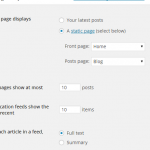
When you create a custom blog page it will show your most recent 10 posts, by default. You can make a few posts sticky posts, which will put those posts at the top of the page. However, you can also change the number of posts displaying on your blog page. This is a pretty easy process and one of the easier things to do in WordPress. However, before we get into changing the number of posts, it’s important to understand what a higher or lower number may cause. If you choose a number higher than the default display of 10 …
A Quick Guide to Adding a Caption to Your Images in WordPress
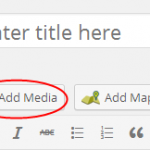
If you’ve ever seen a site that adds a small text caption to their images, you may be wondering how to do this for your own WordPress blog. This is a built-in function found within the WordPress dashboard. It’s pretty easy for anybody to add a caption to an image. Here are the instructions you need to make this happen. Adding Captions to Images in WordPress First you will need to either upload your image in the medial library or within the post or page you’re working on. The easiest way to do this is by adding the image within …
Can You Link the Post Title to an External Link in WordPress?

Have you come across a helpful resource you’d like to simply link to from your WordPress blog title? When this happens, beginners may not know how to make this happen, but it is possible to link the post title to an external link in WordPress. You will be using a custom filed hack to allow your WordPress blog to link to an external resource from the post title. This will allow your readers to click on the title and find the resource you want to share. You may want to create a “resource” category or section on your blog specifically …
An Easy Way to Embed Bing Maps on Your WordPress Blog

Adding Bing Maps to your WordPress website makes a lot of sense and you may not know how to go about doing this. If you’ve decided you want to use these maps over the Google Maps, which can also be embedded in WordPress, you need to know how to add them to your blog. Here are the instructions you need for adding Bing Maps to your WordPress website. How to Add Bing Maps Without a WordPress Plugin You can easily embed Bing Maps in WordPress without the use of a plugin. Start by visiting the Bing Maps website and searching …
Can You Display a User’s IP Address in WordPress?

It’s possible to display an individual visitors’ IP address within your WordPress website. However, this will require adding a snippet of code to the functions.php file of your theme. You can access this file by logging into your cPanel and going to the root folder for your WordPress website. Go to WordPress ROOT Directory >> wp-content >> YourThemeName. Here, you can create your own IP detection for your site. This is done by adding the following snippet of code to your functions.php file. After you’ve completed this task, you just want to add the right shortcode within a page, post, …
A Beginner’s Guide to Adding Post Thumbnails or Featured Images in WordPress

Post thumbnails and featured images are the same thing within WordPress. A handful of themes for photographers, churches, restaurants and other type of websites use a type of built-in support for featured images. When you use this type of image with each post, it can create a better visitor experience. Where do you Find the Featured Images Section in WordPress? Within each post you create, you will see a section that allows you to set the featured image. This section is found on the right side of the edit screen below the tags. This section is quite easy to locate …
Common WordPress Keyboard Shortcuts to Help Save You Time

Are you aware of the many different keyboard shortcuts offered with WordPress? When you want to speed up your posting and really learn how to make WordPress easier to work with, understanding these shortcuts is very important. Visual Post Editor Keyboard Shortcuts for WordPress Instead of using the mouse to choose all your different formatting icons, you can use your keyboard. Here are some of the most common shortcuts you can use from your keyboard. Ctrl + b = Bold Ctrl + i = Italics Ctrl + c = Copy Ctrl + v = Paste Ctrl + x = Cut …
Should You Upload Videos Directly to WordPress?

Uploading images, videos and audio are all possible within WordPress. These items make your website much better than not using them. However, adding videos to your website can take up a large amount of space. There is a way to go about doing it without using up all your space and slowing down your load times. You should NEVER upload videos directly to your WordPress website for many reasons. The most common reason is the space they take up, though. Here’s what you need to know about using and uploading videos. The Difference Between Embedding and Uploading Videos Understanding the …
