

A Beginner’s Guide to the Media Section of the WordPress Dashboard
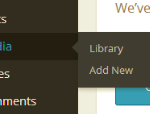
The media section of the WordPress dashboard can often be very confusing for beginners to the world of WordPress. However, it doesn’t have to be confusing. Below, you will find all the information you will need to use the media section to manage all your pictures, videos, audio files and other media files. When you click on “Media” you will see two tabs under this section: The “Library” section holds all the images, videos, audio files and other media files you’ve uploaded to your WordPress website. The “Add New” section allows you to add a new media file to your …
How to Create a Custom Menu and Use it in WordPress

Custom menus make it easy to add specific lists of pages, posts or links to different sections on your WordPress website. Have you ever seen a list of links in the footer and wondered how the owners made that happen? They are most likely using custom menus and widgets to make this happen. Creating Your Custom Menu The first step in creating a custom menu in WordPress is to go to Appearance >> Menus. This is the section where you will create your menu, which can later be used as a widget in your sidebar or footer. Start by giving …
A Beginner’s Guide to the Widgets Section in WordPress

The widget section of your WordPress dashboard is a very powerful area to customize your site. Depending on the theme you’re using, you can add widgets to different sections of your site. Most themes will allow you to add widgets to the sidebar, footer and sometimes the header. This section shows the areas you can add widgets to on the right side of the page. It may look something like this: Your theme may include other areas. Any section of your website that allows you to add a widget will be found here. How to Add a Widget to Your …
A Beginner’s Guide to the Add New Post Section in WordPress
As a beginner, you may feel like you’re trying to learn a foreign language by using WordPress. There are so many sections to learn how to use and so many questions you will need answers for. In this post, we will cover all the basic features of the post edit screen. Note: If you’re using plugins for your WordPress site, you may have more options than just the basic post editor options covered in this WordPress tutorial. What is the Post Editor Screen and Where do you Find it? After you’ve logged into your WordPress dashboard, you can find the …
Can you Add the Google Search Box to Your WordPress Blog?
Beginners are always looking for new ways to add cool features to their WordPress blogs. One of those features is the Google search box they see on other sites. You can add this search box to your WordPress website and it’s pretty easy to do. Creating Google Search to Your WordPress Site Some themes have this feature built into the layout of the actual theme. If this is the case, you may just need to enable the option or add the search widget to the right spot. However, if your theme doesn’t have Google search built in or the search …
A Beginner’s Guide and Introduction to the Basic WordPress Dashboard – Part Two
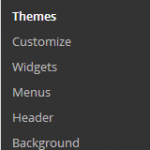
This post is a continuation from the first part of the WordPress Dashboard Tutorial found here. In this part, we will cover the rest of the tabs not covered in part one. An Introduction to the WordPress Dashboard Tabs, Continued Continuing were we left off, the Appearance Tab is up next. Appearance Tab The Appearance Tab is another very important section, but you won’t need to use it very often, once you’ve set the look for your WordPress blog or website. It contains many sub-sections and each allows you do customize your site in a different way. Here’s a quick …
A Beginner’s Guide and Introduction to the Basic WordPress Dashboard – Part One
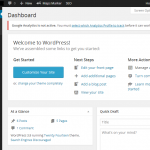
Sometimes it can be hard for veterans to WordPress to remember all the way back to when they started, especially those that remember the 1.xx versions of WordPress. This very powerful blogging and website development platform can be very confusing for beginners. This post will introduce you to all the basic sections of a WordPress dashboard. How the WordPress Dashboard is Organized When you first login to your new WordPress website, you will log into the dashboard, which is also referred to as the admin area of your blog or site. You will see a page that looks similar to …
Can You Schedule a Sticky Post to Expire in WordPress?
Recently, a question was asked by a WordPress beginner, on our blog. It took a little digging, but we’ve found the answer. One of our users was curious to know if it’s possible to schedule a sticky post to expire. You can find out more about sticky posts and view the comments, here. Why Would You Want a Sticky Post to Expire? The most popular reason to use a sticky post and let it expire involves some type of sale or discount. Maybe you run a business selling goods or services to your visitors. If you wanted to offer a …
Can you Add Buttons to a WordPress Website Without Using Shortcodes?

Since many of the WordPress and blogging beginners don’t know much about CSS, HTML and other coding languages, plugins make customizing a website much easier. Most of the plugins use shortcodes to make it easy to add buttons to your WordPress website. This is a great way to go, but there’s an easier way. With the release of WordPress 3.9, a new plugin was created and added to the directory. It’s called “Forget About Shortcode Buttons” and you will need to update your WordPress website to 3.9 or higher to use this plugin. Download the plugin here, Forget About Shortcode …

Understanding the Comments Section of Your WordPress Dashboard
The comments section of the WordPress dashboard is pretty easy to work with. It doesn’t include any sub-sections and just takes you to a screen with all the comments that have been left on your posts and pages. Here’s a quick guide to the comments section within your WordPress dashboard. The Different Comment Types When you go to the comments tab, you will find a screen that looks like this: Across the top of this page, you will see the following links: These are the different types of comments you have on your WordPress blog or website. If the “All” …