

 If you know your website needs to go from HTTP to HTTPS and you need a SSL certificate, it’s necessary to know how to make this happen. You don’t even have to understand what SSL and HTTPS is because you’re about to find out. Here is how you can easily use both with your WordPress website.
Defining HTTPS and SSL
We often share our information with websites for purchases, setting up profiles, logging in and other things. The SSL and HTTPS are used to help secure the connection and protect the transfer of data.
Secure HTTP or HTTPS is a method of encryption used to secure the connection between your server and the browser. This makes it very difficult for hackers.
The SSL certificate is the other part of the process. This certificate helps to identify your site and if it doesn’t match the HTTPS, browsers will give the user a warning.
Do you Really Need HTTPS and SSL?
When you run an eCommerce website or any type of website that takes payments, you must get an SSL certificate. Most of the payment provides will require a secure connection with SSL, such as PayPal Pro, Stripe and Authorize.net.
You need HTTPS and SSL if you are collecting any information from people at all. It won’t’ make a huge difference in the speed of your site, which is something many people worry about. Make sure you get both, if you take payments or collect any type of information from users.
Using SSL and HTTPS with WordPress
After purchasing a SSL Certificate, you can ask your web hosting provide to take care of the installation process. After this is done, you will need to make a few changes in WordPress.
Start by going to Settings>>General. Within this section, you will need to update the URL address fields.

If this is something you are doing for an existing WordPress sites, you will need to set up a redirect from HTTP to HTTPS. This is done within the .htacess file.
Using SSL and HTTPS on Exclusive Pages
If you need to use SSL and HTTPS on exclusive pages, you can use a plugin for this. The plugin is called WordPress HTTPS (SSL).
After you activate the plugin, you will get a new menu called HTTPS. This menu will allow you to use the settings menu to set up exclusive pages for HTTPS and SSL.
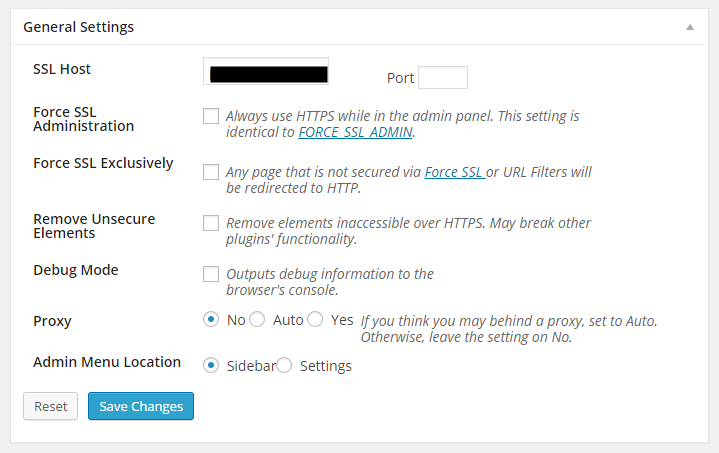
You will need to enter the SSL host, which is usually your domain name. It may be a subdomain, if that is where your SSL certificate is. You may also need to enter hosting information if you are using a shared SSL certificate.
If you want to force your site to use HTTPS within the admin area, check the Force SSL Administration setting. You can also make this exclusive and set up pages with the Force SSL Exclusively option.
After you select this option, you will need to edit those specific pages and use the HTTPS box to secure the page or post.
Now you can set up HTTPS and SSL on your WordPress site. If you plan to collect payments or information, make sure you set up both to make your site secure for your users.
