

Adding a border around an image in WordPress can help highlight the picture within a post or page. This is a pretty easy thing to do and you won’t need to edit any CSS or HTML code. Here’s how it’s done.
Using WP Image Borders

The easiest way to add a border to any image is with the WP Image Borders plugin. Start by installing and activating the plugin. Then, you can access it from Settings>>WP Image Borders within your dashboard.

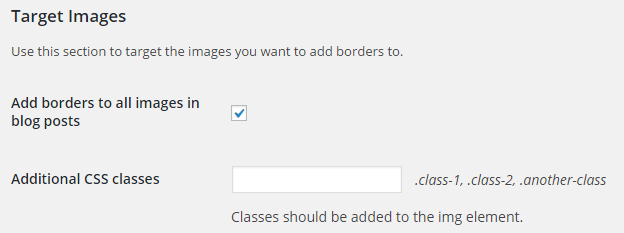
From the settings menu you will be able to add borders to all your images in WordPress posts with the checkbox for “Add Border to All Images in Blog Posts.”
You will also be able to choose the type of border you want to use, along with the width, radius and color.

The settings menu will even allow you to add a drop shadow to your images with a different color and size.

Once you have made your selections, you will want to click the “Save Changes” button.
If you want a border on all images, you don’t have to do anything else. However, if you don’t, you will need to add CSS class to images in WordPress and add those classes within the plugin settings.
How to Add CSS Class to an Image
All you have to do to add CSS class to an image is upload it into a post, click the edit button and use the advanced options to enter the CSS class.

Just click the update button and you’re all set. You will need to go back to the plugin and add the CSS class you chose for the image to the plugin.

Now you can easily add a border to any or all of your images on your WordPress website. Just use the plugin and the instructions provided to create beautiful borders around your images.
