

Can you Add Remote Media Libraries to your WordPress Website?
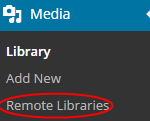
Those looking to actually publish videos online often choose WordPress because of the many powerful options that come along with it. Sometimes, it can be hard to find the right way to add remote media libraries to your WordPress site. Here’s a look at how to do this and do it with easy. The Remote Media Libraries Plugin Using the Remote Media Libraries Plugin will help you add the media libraries you want to add. Simply install and activate this plugin and you will get a new section under “Media” called “Remote Libraries.” After you have this menu, click on …
What Should You Do if Your WordPress Website Won’t Update Immediately?

Sometimes, when you make changes to a widget or to a post, your WordPress website won’t update immediately. This can make it hard to see the changes you’ve made and make sure they are done correctly. Here’s what you should do if this happens to your WordPress website. Most Common Symptoms The one thing you will notice before any other, when your site won’t update immediately, is new posts not showing up on the homepage. You can still see the post in the single post view, but for some reason it won’t show up on your actually homepage. You may …
Which Calendar Plugin should You Use for WordPress?
Finding the right Calendar Plugin for WordPress can make a difference for your overall WordPress website. There are plenty of great choices out there and they all do something a little bit different. Here’s a look at some of the top choices for WordPress Calendar Plugins. The Events Calendar This plugin will allow you to manage and create events on your website. It provides a professional way to put your events up on your website with an Event Calendar. The plugin allows for ticket sales, publicity, Facebook event integration, new views and so much more. The plugin is very plug-n-play …
What Came New With WordPress 4.0?
WordPress 4.0 has been out for a little while now. If you have yet to update, it’s time to do so. Here are some of the changes you will notice when you update to the newer version of WordPress. Better International Support One of the additions to WordPress 4.0 is the ability to use more languages. You can now choose from a number of different languages without needing to manually upload the translation files. A Better Media Library The media library allows users to upload and use pictures and video on their WordPress website. It’s now new and improved in …
Using Split Test Title for More Clicks with WordPress Posts
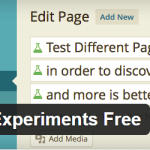
Split testing can be a very powerful way to find the most clickable title for a WordPress post. Many internet marketers use split testing with landing pages and other elements. You can now use it with your WordPress posts titles. Using the Title Experiments Free Plugin for WordPress With the Title Experiments Free Plugin for WordPress, you can A/B spit test titles for your WordPress posts. This allows you to increase pageviews and get more clicks to your blog and website. Simply download the plugin, install it and activate it from your WordPress Dashboard. Once the plugin is activated, you …
Should You Use Markdown in WordPress and How is it done?
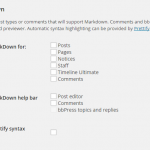
When you decide you may want to use Markdown in WordPress, it’s important to know what you’re getting into. Not everybody understands what Markdown is and not everybody needs it. What is Markdown? Markdown is simply the use of markup language to take plain text and convert it into HTML. It’s like using a simple text editor. This language will take the text you insert and will convert it to HTML code without you needing to put in the code. Example If you were using markdown, you could type **make this bold** and the ** would be converted into the …
How to Use Maintenance Mode in WordPress

We have all found a website online that said “Our Site is currently in Maintenance Mode.” This can be annoying, but there is a good reason for putting a website into Maintenance Mode. Usually, this is done when things need to be changed and the site owner doesn’t want visitors to have a bad experience during the changes. Most website owners try to handle the maintenance during the slower hours of the day/week, but this isn’t always possible. When you put your WordPress website in maintenance mode, you want to be able to do it the proper way. Using the …
Can you Publish your WordPress Posts and Update them from the Bottom of the Screen?

Do you find it annoying when you scroll down too far in the WordPress posts screen that you cannot publish without scrolling back up? This can slow down the process, but it’s not necessary to scroll back to the top of the screen to update or publish your posts. With the right plugin, you can update and publish from the bottom of the screen with ease. Using the Update from Bottom Plugin Before you go any further, you will need to download and install the Update from Bottom Plugin. After you have activated the plugin, you can simply go to …
Can you Match the Content Height by Auto Adjusting the WordPress Sidebar?
Sometimes, when we add the many cool things widgets allow us to add to WordPress, we end up with a sidebar much longer than the content. This isn’t always attractive and can leave quite a bit of blank space. However, there is a way to automatically make the height of your sidebar match with the content. Using the SidebarAutomizer plugin It starts when you decide to install and activate the SidebarAutomizeer Plugin. This plugin will allow you to match your sidebar height with your content height. This plugin will add a new menu under Settings called sidebarAutomizer. Once activated, you …
Can you Add Staff Member Profiles with Staffer to WordPress?
Adding staff member profiles in WordPress has gotten much easier. With the help of the Staffer Plugin, you can add profiles with ease. No longer will you need to edit templates to make these profiles happen. Instead, you can use the plugin and simplify the process. It all starts with activating the plugin. Once it’s activated, you will see a new admin menu called “Staffer Options.” This section will be found under “Settings” and will allow you to make the necessary changes to the plugin. Within the Staffer Options Panel, you can decide how you would like to display the …
